Ask ten tomography users which software they rely on and you will get ten answers, several caveats, and at least one apology. The CT pipeline — reconstruction, segmentation, mesh repair, visualization, downstream modelling — has never been served by a single package. Need to choose between them, but don’t have time to evaluate a dozen candidates?
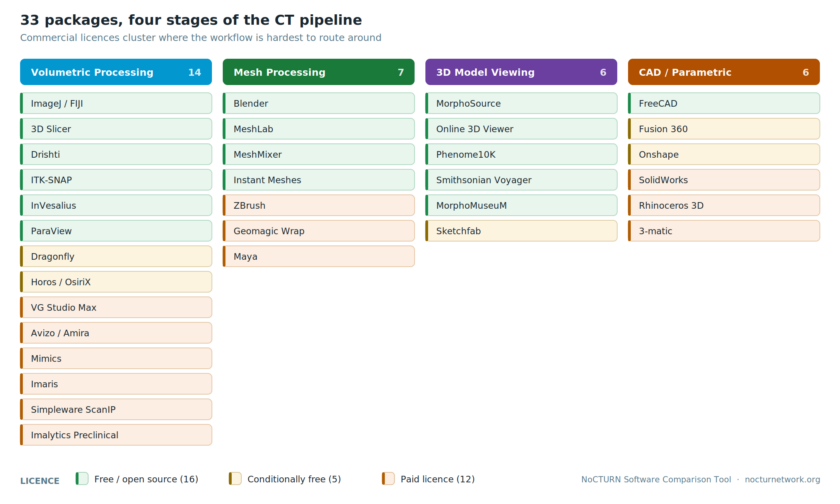
The NoCTURN Software Comparison Tool exists to shorten that process. It is a browser-based, dynamic, side-by-side comparison of 33 packages the CT community actually uses, scored against 15 capabilities, organized so that the differences between 3D imaging software tools are visible at a glance rather than reconstructed from forum threads and institutional folklore.
What it covers
The tool sorts packages into four categories, reflecting the stages at which most users find themselves stuck:
Volumetric processing (14) — ImageJ/FIJI, 3D Slicer, Dragonfly, VG Studio Max, Avizo/Amira, Mimics, Drishti, ITK-SNAP, InVesalius, Imaris, Horos/OsiriX, ParaView, Simpleware ScanIP, Imalytics Preclinical
Mesh processing (7) — Blender, MeshLab, ZBrush, MeshMixer, Geomagic Wrap, Maya, Instant Meshes
3D model viewing (6) — MorphoSource, Online 3D Viewer, Sketchfab, Phenome10K, Smithsonian Voyager, MorphoMuseuM
CAD / parametric modelling (6) — FreeCAD, Fusion 360, SolidWorks, Rhinoceros 3D, Onshape, 3-matic
Fifteen features are scored across four groups: volumetric data processing (image stack manipulation, volume rendering, segmentation, deep-learning segmentation, quantification), mesh capabilities (generation from volumetric data, basic editing, advanced editing, rigging/animation), viewing and sharing (annotations, custom scene backgrounds, web embedding), and community and learning (user community size, tutorial availability).
How it works
Select any two or more packages, across any combination of categories, and the tool builds a feature matrix comparing them row by row. Rows where the selected packages diverge are flagged with a marker (◆), so attention goes straight to the points of difference rather than the long list of features everyone shares. Open-source packages carry their own marker (✦).

A cost filter narrows the field to free and open-source options, paid options, or both. A search field handles the case where you already know the name and simply want to see what it is up against. Licensing caveats are attached where they matter — Dragonfly is free for non-commercial use, Maya offers a free academic license, Fusion 360 and Onshape have free personal and academic tiers, Horos is free while OsiriX is not.
What the matrix makes obvious
Three patterns emerge quickly once the data is laid out.
Cost is not evenly distributed across the pipeline. Sixteen of the 33 packages are free, five more are conditionally free, and twelve are paid. But the paid tools cluster: six of fourteen volumetric packages are commercial, and the ones carrying “~High cost; varies by licence type” — VG Studio Max, Avizo/Amira, Mimics, Simpleware, Geomagic Wrap, 3-matic — sit at the point where your workflow is hardest to route around. The viewing and sharing tier, by contrast, is almost entirely free and repository-backed.
Deep-learning segmentation is still a narrow field. Five packages offer it (as of this posting): 3D Slicer, Dragonfly, VG Studio Max, Avizo/Amira, and Imaris. Of those, one — 3D Slicer — is free and open source.
No package spans the whole workflow. The tools that both generate meshes from volumetric data and handle advanced mesh editing number four: VG Studio Max, Avizo/Amira, Mimics, and 3-matic. All are commercial. Everyone else stitches a pipeline together — which is exactly why a comparison across categories, rather than four separate lists, is the useful shape for this tool.
Why this matters for FAIR and open science
NoCTURN’s remit is the fragmentation of the tomography toolkit: proprietary formats, inconsistent metadata, and workflows that resist reproduction by those outside the team that produced them. Software choice sits upstream of it all. A package selected because it was the one already installed on the workstation determines, quietly and permanently, what a dataset’s file formats, metadata, and reusability will look like years later.
Making that choice deliberate, and making the fifteen free and open-source options visible alongside the commercial ones, is a modest intervention with disproportionate downstream effect.
Who it is for
- New CT users establishing a workflow and unsure where to begin
- Facility managers fielding the same software question weekly
- Instructors building coursework around tools students can access after graduation
- Established researchers reconsidering a pipeline assembled years ago under different constraints and different prices
Try it
The comparison tool runs entirely in the browser, requires no account, and is free to use.
Open the NoCTURN Software Comparison Tool →
The tool is a living resource. Pricing shifts, features arrive, packages are discontinued, and acquisitions rearrange the field with some regularity. If a package is missing, a feature is misrepresented, or a listing has gone stale, tell us. The CT community is a reliable source of correction, and we would rather hear it from you than discover it later.